


Last Updated: November 1, 2026
Quick Summary
A teaching portfolio is a curated collection of evidence showing how you teach, what your students learn, and how you reflect on your practice. Unlike a CV, which lists credentials, it demonstrates your online teaching in action, which remote hiring committees often want to examine.
- A CV answers what you have done; a teaching portfolio answers how well you do it and how you know.
- Include a teaching philosophy of one to two pages, plus two or three annotated course samples.
- Anonymize student feedback and remove names or identifying details before sharing it.
- Annotate each artifact in two or three sentences covering the goal, design choice, and result.
- Keep a master digital version and export a PDF tailored to each application.
Table of Contents
- What a Teaching Portfolio Is and How It Differs From a CV
- Why Online Hiring Committees Ask for a Teaching Portfolio
- What to Include in a Teaching Portfolio for Online Courses
- Teaching Portfolio Template: A Structure You Can Adapt
- How to Create a Teaching Portfolio Step by Step
- Online Teaching Portfolio Examples With Annotations
- Sharing Your Portfolio in Remote Applications and Virtual Interviews
- Start Your Online Teaching Portfolio This Week
- Frequently Asked Questions
What a Teaching Portfolio Is and How It Differs From a CV
A teaching portfolio is a curated collection of evidence that shows how you teach, what your students learn, and how you reflect on your practice. Unlike a CV, which lists your credentials and appointments, a teaching portfolio demonstrates your teaching in action.
Your CV answers "what have you done?" Your portfolio answers "how well do you do it, and how do you know?" Hiring committees reviewing remote candidates often want both, and the portfolio is where you show your digital pedagogy in a form they can actually examine.
Why Online Hiring Committees Ask for a Teaching Portfolio
Remote hiring committees cannot observe your teaching in a live classroom, so they look for documented evidence of your asynchronous student engagement, your course design, and your responsiveness in a digital environment.
If you can show a sample module built in a standard LMS, with clear learning outcomes and accessible materials, you answer a question the committee would otherwise have to ask.
What to Include in a Teaching Portfolio for Online Courses
Focus on artifacts that prove something specific about your online teaching. Strong portfolios typically contain a short statement of teaching philosophy, sample course materials, evidence of student learning, and student feedback. Quantify where you can, and describe the outcome with the context needed to interpret it.
Teaching Philosophy and Student Feedback
Your teaching philosophy should be one to two pages and describe how you build online community, pace asynchronous work, and give feedback at a distance. Readers can learn how to write a teaching philosophy statement tailored to academic hiring committees. Pair it with anonymized student feedback from past online courses. Remove names and identifying details, and only share feedback you have permission to use.
Lesson Materials, LMS Work, and Student Outcomes
Include screenshots or exported samples of a module you designed, a rubric you use, or an announcement template. Where you have it, add student outcome data such as assessment averages or completion rates, with the context needed to interpret them. Protect student privacy throughout: never include identifiable student work without consent, and check your institution's data policies before sharing course content externally.
Teaching Portfolio Template: A Structure You Can Adapt
A simple structure works for most remote candidates, but the strongest portfolios are tailored to where you sit in the online teaching pipeline. Many candidates also keep an application tracking spreadsheet template to organize the applications they submit alongside their portfolio.
Core structure (adapt the order to the posting):
- Cover page: name, contact information, and a one-sentence statement of your online teaching focus
- Teaching philosophy: 1 to 2 pages on how you teach online
- Course samples: 2 to 3 modules or syllabi, each with a brief annotation explaining your design choices
If a posting emphasizes LMS fluency, lead with course samples. If it emphasizes student support, lead with feedback and outcomes.
Checklist for Subject Matter Experts Entering Online Teaching
If your expertise comes from industry rather than a classroom, committees are assessing whether you can translate that expertise into a structured online course. Include:
- A sample module that converts a professional workflow into sequenced learning objectives, activities, and assessments
- A short note explaining how you adapted workplace examples for students without your industry background
- Any completed online teaching training, LMS vendor certifications, or faculty-development workshops
Checklist for Experienced Online Adjuncts and Faculty
If you already teach online, the portfolio should prove consistency and improvement across terms, not just competence in one course. Include:
- Two or three modules from different courses or terms, each annotated with the design decision and the result
- Longitudinal evidence: how a discussion protocol, rubric, or feedback routine changed between terms and what shifted
- Anonymized student feedback grouped by theme (clarity, responsiveness, course structure) rather than a wall of quotes
Checklist for Candidates Moving From Another Sector Into Online Higher Education
If you are coming from K-12, corporate training, or a non-teaching role, address the transition directly. Include:
- A crosswalk note that maps your prior instructional experience to online higher-education expectations
- A sample assessment designed for adult learners working asynchronously
- Evidence of familiarity with accessibility standards and institutional data policies
How to Annotate Each Artifact
Annotations are where most portfolios succeed or fail. Readers deciding how to quantify online teaching impact can see guidance on quantifying teaching impact on a CV. For each item, write two to three sentences covering three things: the goal (what you wanted students to do), the design choice (why you built it this way for an asynchronous environment), and the result (what happened, with context).
Choosing a Format: PDF Versus a Digital Portfolio Site
Both formats are acceptable, and the posting usually signals a preference. A single PDF is easiest to attach to an institutional application system and guarantees the layout renders the same way everywhere.
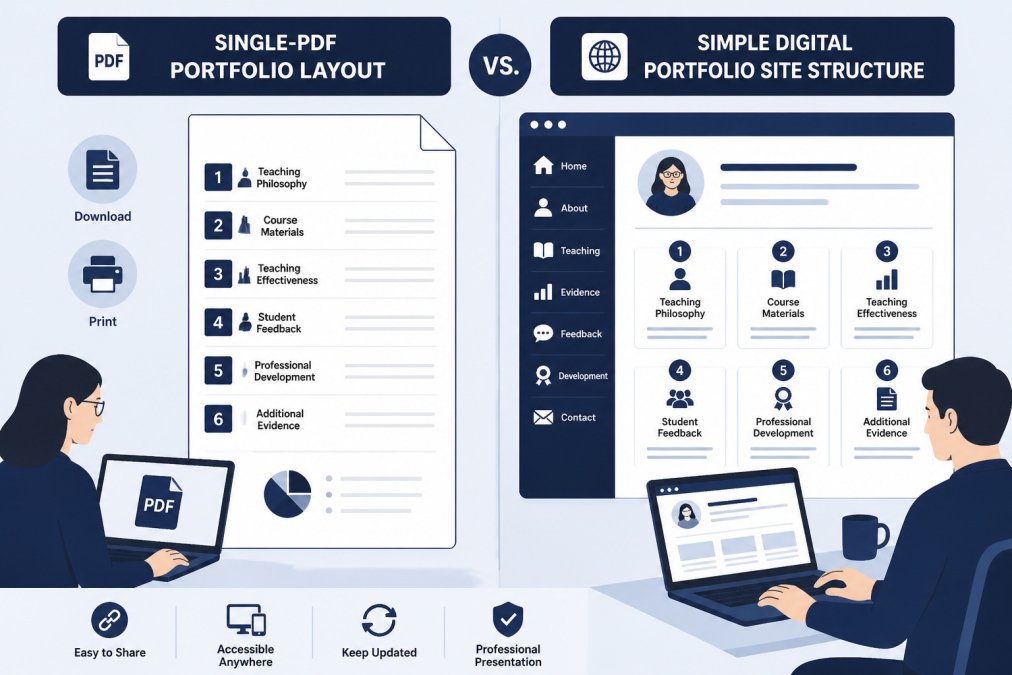
The core structure breaks down into six sections that most remote candidates can adapt to any posting.
| Section | What it contains | Notes |
|---|---|---|
| Cover page | Name, contact information, one-sentence online teaching focus | Set the frame in one glance |
| Teaching philosophy | 1 to 2 pages on how you teach online | Describe concrete online practices |
| Course samples | 2 to 3 modules or syllabi with annotations | Each annotation explains design choices |
| Evidence of learning | Anonymized outcomes and feedback examples | Pair numbers with context |
| Student feedback | Selected, anonymized quotes | Note the course and term |
| Professional development | Online teaching training and LMS certifications | Include relevant workshops |
How to Create a Teaching Portfolio Step by Step
Most guides stop at "gather your materials." The steps below go further: they build in privacy, accessibility, and measurable evidence from the start, so you are not retrofitting them later.
- Inventory your materials. Gather syllabi, module exports, rubrics, discussion prompts, recorded lecture clips, and any feedback you have received. Keep a running list so you are not rebuilding from scratch each term.
- Select your strongest artifacts. Choose work that matches the online courses you are targeting. A common pattern is to keep two or three artifacts per claim you want to make about your teaching.
- Write your teaching philosophy. Describe concrete online practices, not abstract ideals. Name how you build community asynchronously, how you pace workload, and how you give feedback at a distance.
- Annotate each sample. Explain the goal, the design decision, and the result in two or three sentences.
- Connect artifacts to outcomes without overstating them. Where you have assessment averages, completion rates, or feedback themes, pair each number with the context needed to interpret it.
- Build privacy and consent in from the start. Remove student names, ID numbers, and any identifying details from student work and feedback. Obtain permission before sharing student work, and check your institution's data policies before posting course content externally. When in doubt, paraphrase or use a composite example rather than an identifiable artifact.
- Design for accessibility. Use readable layouts, sufficient contrast, descriptive alt text for images, and captions for any video. If you build a digital portfolio site, test it with a screen reader and confirm it works on mobile. Accessible design is itself evidence of your online teaching competence.
- Build a digital version. Use a simple format that loads quickly and works across devices. Keep a master copy you can export to PDF for institutional application systems.
- Review and update each term. Replace older samples with newer work as your teaching evolves, and refresh annotations to reflect what you learned.
A Simple Maintenance Routine
Portfolios decay quietly. Set a recurring review, once per term is a common rhythm, and do three things: retire the oldest artifact, add one new annotated sample, and update your philosophy if your practice has changed. Keeping a master version and exporting tailored PDFs per posting can keep the maintenance burden low while still matching each job's emphasis.
Common Mistakes to Avoid
- A portfolio that is all philosophy and no evidence. Committees skim for proof, so keep statements short and artifacts visible.
- Unannotated artifacts. A screenshot with no explanation forces the reviewer to guess what they are looking at.
- Overstating impact. Pair every number with context and avoid implying that a single metric proves teaching effectiveness.
Online Teaching Portfolio Examples With Annotations
Consider a remote adjunct who teaches introductory psychology online. Their portfolio includes a module on memory with an embedded short video, a discussion prompt that asks students to apply the concept to everyday experiences, and a rubric with clear criteria.
Another candidate, a subject matter expert moving into online teaching, might include a sample lesson that translates professional experience into a structured course module, with a note on how they adapted examples for students without workplace exposure.
Sharing Your Portfolio in Remote Applications and Virtual Interviews
Send a link to a digital portfolio or a single PDF, whichever the posting requests, and keep the file small enough to open quickly.
Tracking where you have sent each version matters, especially when you apply to dozens of institutions. A Job Application Tracker can help you manage follow-ups and virtual interview scheduling from one dashboard. You can also explore faculty interview coaching designed for remote panels and teaching demonstrations.
Start Your Online Teaching Portfolio This Week
A teaching portfolio turns your online teaching into evidence a remote hiring committee can review. Start with one sample module, one short philosophy paragraph, and one piece of anonymized feedback, then build from there. Faculty Job Tools has supported online faculty since 2003, and the team can help you shape a portfolio that fits the remote roles you want. Start with the free 7-day trial of the Job Application Tracker and begin organizing your portfolio alongside your applications.
Frequently Asked Questions
What is the importance of a portfolio?
A teaching portfolio gives hiring committees evidence of how you teach, rather than only a list of courses taught. For online teaching positions, it shows how you run asynchronous discussions, structure a Learning Management System course, give feedback without face-to-face contact, and support student learning at a distance. Committees use it to compare candidates on teaching practice, not just credentials. A well-organized portfolio also gives you material to draw on in cover letters, LinkedIn updates, and virtual teaching demonstrations, so the same evidence works across every application you send.
What should an online teaching portfolio include?
An online teaching portfolio should include a teaching philosophy statement, a short summary of your teaching experience, sample course materials such as a syllabus, module structure, or discussion prompts, and evidence of student learning or feedback. Include examples of how you use your Learning Management System, how you communicate with online students, and how you adapt courses for accessibility. Keep each artifact short, labeled, and tied to a teaching claim you make in your philosophy statement. Remove any student-identifying information before sharing.
How long should an online teaching portfolio be?
Most online teaching portfolios work best when they are concise enough for a hiring committee to review in a single sitting. Many candidates aim for a focused document with a short overview, a few well-chosen artifacts, and clear annotations explaining what each piece shows. Adding more items rarely helps if they do not support a specific teaching claim. Quality and relevance to the role matter more than total page count, so tailor the selection to each remote position you apply for.
Can I create an online teaching portfolio if I have limited teaching experience?
Yes. Candidates with limited teaching experience can build a strong online teaching portfolio by drawing on course design work, tutoring or mentoring done online, training materials, and teaching assistant responsibilities. Focus on evidence you can show, such as a sample discussion prompt, a module you designed, or feedback from a supervisor. A teaching philosophy grounded in specific, realistic examples is more persuasive than a long list of unrelated roles. Be accurate about the scope of your experience.
How should I share a teaching portfolio during a virtual interview?
Share your teaching portfolio as a link or a secure PDF that you can open on screen during a virtual interview. Name the file clearly, test the link before the interview, and keep the most relevant artifacts ready to display. Use the portfolio to anchor your answers, for example by walking the panel through a sample online module or discussion prompt. Confirm the committee's preferred format in advance, and avoid sending files that contain student data.

About the author...

I am Dr. Dani Babb - I founded and currently run Faculty Job Tools to help educators navigate the academic hiring process with clarity, confidence, and results. Since 2003, I’ve worked with tens of thousands of professors and aspiring instructors to land meaningful teaching positions across higher education.
As a professor, doctoral mentor, and author of multiple editions of Make Money Teaching Online, I bring decades of firsthand experience on both sides of the hiring process. I regularly interview deans, department chairs, and hiring managers to learn exactly what they’re looking for. These are insights I share directly with every client I work with and weave into every CV that I personally write.
I also lead a community of educators in the free Make Money Teaching Online online teaching forum where members post job openings, share advice, and support one another through every step of the academic job search.
I remain personally involved in every part of Faculty Job Tools because I care deeply about helping educators find opportunities that fit their expertise and passion. My goal is to make the process straightforward, transparent, and genuinely supportive for every faculty member who’s ready for their next chapter.