


Table of Contents
- Why an Academic Job Application Tracking System Beats a Spreadsheet
- What to Track: Fields Every Online Teaching Application Log Needs
- Step 1: Set Up Your Tracker and Import Active Applications
- Step 2: Organize Application Materials and Online Teaching Resume Optimization
- Step 3: Build a Library of Remote Adjunct Faculty Application Templates
- Step 4: Learn How to Follow Up on Online Teaching Jobs Without Guessing
- Step 5: Manage Virtual Interviews, Search Committee Notes, and Post-Application Workflow
- Common Mistakes That Wreck an Academic Job Application Tracking System
- Frequently Asked Questions
Last Updated: September 27, 2026
Why an Academic Job Application Tracking System Beats a Spreadsheet
An academic job application tracking system is a dedicated tool for logging every online teaching application, its materials, deadlines, and follow-ups in one searchable place. This guide from Faculty Job Tools covers how to build one that survives a long remote hiring cycle. A spreadsheet fails at exactly the moment it matters.

What to Track: Fields Every Online Teaching Application Log Needs
Every online teaching application log needs consistent fields, or it stops being useful fast. In practice, most people track too little, then can't answer basic questions months later. The fix is a defined schema, a fixed set of columns or card properties you fill in the same way for every online adjunct or remote faculty posting.

Core Fields: Job Status, Application Deadline, and Portal
Start with the non-negotiables. Each row or card should capture:
- Institution and job status, use a controlled vocabulary, not free text. A workable set is: Saved, Materials in progress, Submitted, Acknowledged, Screening, Virtual interview scheduled, Virtual teaching demo scheduled, Offer, Closed, no response, Closed, declined. Free-text statuses like "waiting" or "pending" break filtering.
- Application deadline and the date you actually submitted. These are two different fields. Online postings often stay open until filled, so the posted deadline is a soft signal, not a hard cutoff.
- Application portal used, institution system, email, or job board. See the portal taxonomy below.
- Position type, so online adjunct roles stay separate from full-time remote faculty posts and from hybrid teaching roles.
- Next action date, the single field most people forget. Without it, a tracker is a museum, not a workflow.
- Compensation band and credit-hour load, if posted. This lets you sort by whether a remote adjunct contract is worth the prep time.
Portal Taxonomy: Why "Applied Online" Is Not a Field
Most trackers collapse every submission into "applied." That loses the single most useful piece of context for online teaching: where the application lives. A practical portal taxonomy:
- Institution Workday or PeopleAdmin tenant, you'll need the username and the requisition ID to check status.
- Interfolio or similar dossier service, common for remote faculty postings that require confidential letters.
- HigherEdJobs, Inside Higher Ed, or a discipline-specific board, the board is the source, but the application usually redirects to an institution tenant.
- Direct email to a department chair or program director, common for online adjunct pools that hire on a rolling basis.
- Institution's own adjunct pool form, many online programs keep a standing pool rather than posting individual sections.
Version Control: Which CV, Cover Letter, and Teaching Philosophy You Sent
This is where spreadsheets quietly fail. When an institution emails four months after you applied, you need to know exactly what you sent.
Integration With the Platforms You Already Use
This is the field most generic job trackers ignore, and it's the one that saves the most time for online teaching searches. Your tracker should be able to hold or link to:
- The institution's applicant portal URL and login, so you can check status without hunting through email.
- Your LMS evidence, Canvas, Blackboard, Moodle, or D2L course shells, sample modules, or a teaching demo recording. Online search committees frequently ask for a link to a sample course or a recorded virtual teaching demonstration.
- Your Interfolio or dossier link, if letters of recommendation are managed there.
- Your calendar, so virtual interview slots and demo dates appear alongside your next-action reminders.
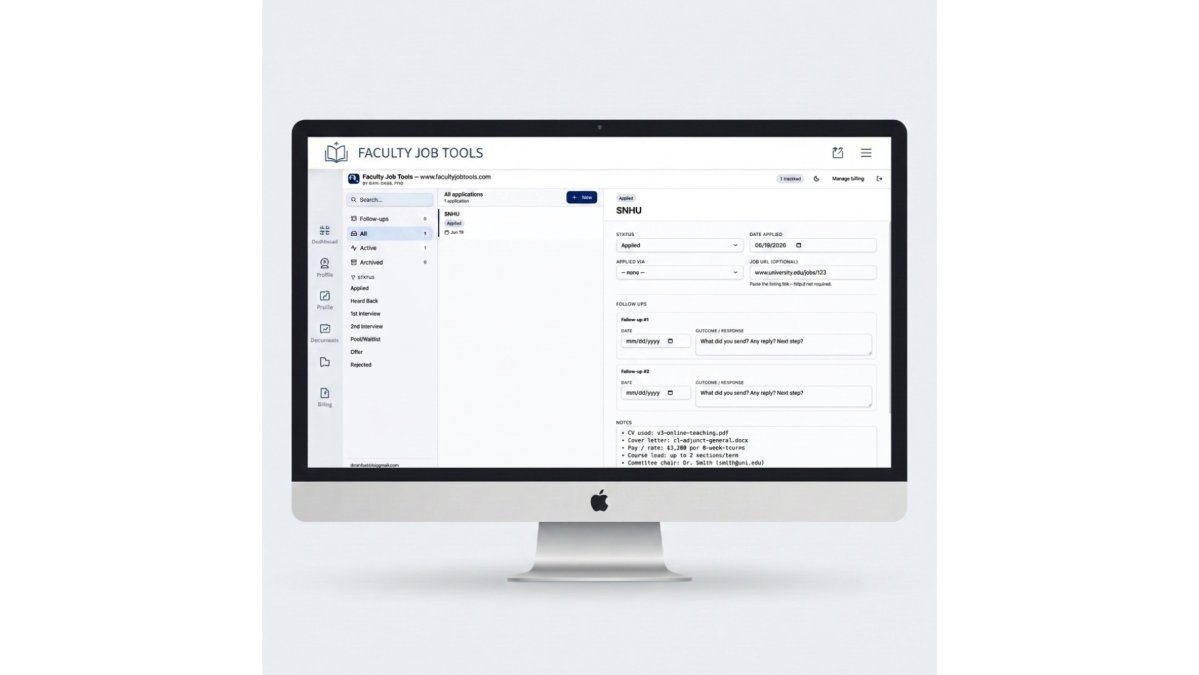
Step 1: Set Up Your Tracker and Import Active Applications
Setting up your tracker is a one-sitting job if you do it in the right order. Start by choosing a tool built for this, not a blank spreadsheet.
Step 2: Organize Application Materials and Online Teaching Resume Optimization
Online teaching resume optimization means tailoring your materials to remote instruction, not campus roles. Your tracker should hold the evidence.
Step 3: Build a Library of Remote Adjunct Faculty Application Templates
Remote adjunct faculty application templates save you from rewriting the same paragraphs for every posting. Build a small library you can adapt in minutes.
Keep templates for:
- Cover letters by discipline and course level
- Teaching philosophy statements for online delivery
- Follow-up emails after submission and after interviews
- Short answers for common portal questions
Step 4: Learn How to Follow Up on Online Teaching Jobs Without Guessing
Knowing how to follow up on online teaching jobs comes down to timing and records. Most candidates either never follow up or do it too often. Both hurt.
Follow-Up Stage |
When to Send |
What to Include |
|---|---|---|
After submission |
~2 weeks |
Brief interest, confirm materials received |
After interview |
24-48 hours |
Thank-you, restate fit for online delivery |
After long silence |
4-6 weeks |
Polite check-in, offer to resend documents |
Step 5: Manage Virtual Interviews, Search Committee Notes, and Post-Application Workflow
Virtual interviews need the same preparation as any interview, plus a rehearsal of the technology. Your tracker should hold the details you'll need on the day, and, more importantly, it should carry you through the long silence that follows.
Before the Virtual Interview
Log these fields for every scheduled interview:
- Search committee member names and roles, if disclosed. Online panels often include a program director, a lead faculty member, and an instructional designer.
- Interview date, time, and time zone. Remote panels span time zones; log the zone explicitly.
- Platform, Zoom, Teams, Webex, or the institution's own system.
- LMS requirements mentioned in the invitation. If they want you to screen-share a Canvas or Blackboard module, note it.
- Virtual teaching demo topic and length, if one is scheduled. Online demos are usually 10-20 minutes and are recorded.
During the Virtual Teaching Demo
A recorded virtual teaching demo is the online-teaching equivalent of the campus job talk, and it's the stage most candidates under-prepare. Keep a short post-demo note in the tracker covering: the topic you taught, the engagement technique you used (poll, breakout room, chat prompt), and any technical hiccup. That note becomes your follow-up email material within the hour.
The Waiting Game: What to Do After You Submit
This is the stage where organized candidates pull ahead, and it's the stage generic trackers ignore entirely. Online faculty hiring runs on rolling timelines, so silence is normal, but silence is not the same as a closed application.
A workable post-application workflow:
- Day 0, Log the submission. Record the portal, requisition ID, and materials version.
- Day 3-5, Confirm receipt, if the portal doesn't. A short email to the department chair or program director asking whether materials arrived is appropriate and rarely penalized.
- Day 14, First substantive follow-up. Restate interest, name the specific online course or program, and offer to provide a sample module or demo recording.
- Day 30, Second follow-up, only if the posting is still live. If the posting has closed or the pool has been filled, stop. Continuing to email after a closed posting is the fastest way to be remembered badly.
- Day 45+, Move to dormant. Keep the record, set a reminder for 90 days, and stop active outreach. Online adjunct pools frequently reopen, and a dormant record with a clean history is what lets you reapply in two minutes.
Follow-Up Cadence at a Glance
Stage |
When |
What to Include |
|---|---|---|
Receipt confirmation |
3-5 days after submission |
One line: confirm materials arrived, restate interest |
First follow-up |
~2 weeks after submission |
Brief interest, name the specific online course or program |
Post-interview thank-you |
24-48 hours after the virtual interview |
Thank the panel by name, restate fit for online delivery, reference one moment from the demo |
Second follow-up |
~30 days, only if posting is still live |
Polite check-in, offer to resend documents or a sample module |
Dormant |
45+ days |
No outreach. Set a 90-day reminder and keep the record clean |
Recording Impressions While They're Fresh
Within an hour of a virtual interview, write three lines in the tracker: what went well, what you'd change, and one specific thing a panelist said. Six weeks later, when a second online program calls, those three lines are the difference between a generic thank-you and a follow-up that references the actual conversation.
Common Mistakes That Wreck an Academic Job Application Tracking System
Most tracking systems fail for predictable reasons. Avoid these and yours will keep working.
- Tracking too few fields. Without job status, portal, and version control, the log can't answer real questions.
- Letting it go stale. A tracker is only useful if you update it the same day you apply.
- Mixing online and on-campus roles. Keep remote faculty and online adjunct applications in separate views.
- No follow-up dates. Without next-action reminders, applications fall into a black hole.
- Scattered documents. Store CV versions, cover letters, and teaching philosophy files where the tracker can find them.
Frequently Asked Questions
Can I use a spreadsheet to track my online faculty job search?
A spreadsheet works until you pass roughly 30 to 40 applications. After that, version control breaks down: you lose track of which curriculum vitae you sent, which teaching philosophy draft went with it, and when a follow-up window closes. A dedicated academic job application tracking system sorts applications by urgency, flags past-due follow-ups, and stores the job URL, portal login, and search committee names in one record. If you are applying to 200 or more online teaching roles, the spreadsheet becomes the problem, not the solution.
How does an applicant tracking system affect my remote teaching resume?
Most online institutions run applications through an applicant tracking system before a human reads them. The system parses your file into fields, so a two-column layout, tables, or graphics can scramble your work history. Use a single-column format, standard section headings like Education and Teaching Experience, and spell out degree names. Mirror the exact phrases from the job posting, such as course names and LMS platforms, so your online teaching resume optimization matches what the recruiter searches for.
How often should I follow up on remote teaching applications?
Send one follow-up email 10 to 14 days after submitting, then a second and final note three to four weeks later if you hear nothing. Address it to the search committee chair or department chair named in the posting, restate the course or term you applied for, and keep it under 150 words. Log each follow-up date in your tracker so you never send a third message or duplicate a note to the same committee member.
What information should I include in my online teaching job application log?
Record the institution, position title, term, application deadline, submission date, portal URL and login, the exact CV and cover letter versions you uploaded, the teaching philosophy file name, any work samples or letters of recommendation requested, search committee names, interview dates, and the date of your last follow-up. Add a short notes field for LMS requirements such as Canvas or Blackboard and any post-interview impressions. That record is what saves you when an institution calls four months later.
Online teaching applications pile up faster than any spreadsheet can manage. Faculty Job Tools gives you a purpose-built Job Application Tracker with a Smart Pipeline Feed, follow-up tracking, and version control, so nothing slips. Start your free 7-day trial and take control of your remote faculty job search.
About the author...

I am Dr. Dani Babb - I founded and currently run Faculty Job Tools to help educators navigate the academic hiring process with clarity, confidence, and results. Since 2003, I’ve worked with tens of thousands of professors and aspiring instructors to land meaningful teaching positions across higher education.
As a professor, doctoral mentor, and author of multiple editions of Make Money Teaching Online, I bring decades of firsthand experience on both sides of the hiring process. I regularly interview deans, department chairs, and hiring managers to learn exactly what they’re looking for. These are insights I share directly with every client I work with and weave into every CV that I personally write.
I also lead a community of educators in the free Make Money Teaching Online online teaching forum where members post job openings, share advice, and support one another through every step of the academic job search.
I remain personally involved in every part of Faculty Job Tools because I care deeply about helping educators find opportunities that fit their expertise and passion. My goal is to make the process straightforward, transparent, and genuinely supportive for every faculty member who’s ready for their next chapter.